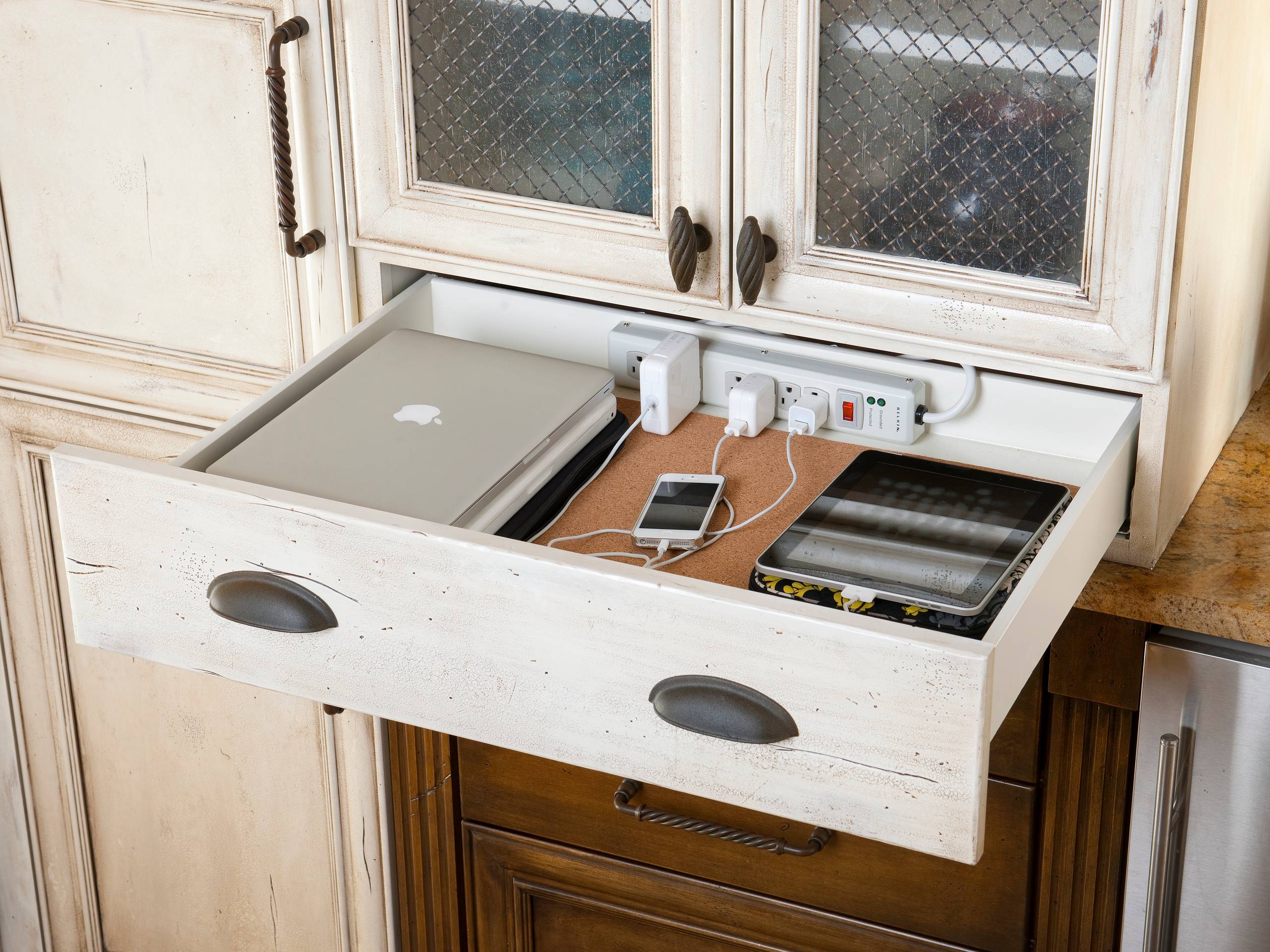
Modern American households may charge several phones, tablets, watches, earbuds, laptops, gaming controllers, cameras, and other devices every day. Without a clear system, charging cables can spread across kitchens, bedrooms, offices, and living rooms.
A family charging station creates one organized location for commonly used electronics. It can reduce missing chargers, cable clutter, blocked outlets, and forgotten devices.
The best design depends on household size, device types, available space, and daily routines.
A charging station does not need to be expensive. A small shelf, drawer, basket, or desk area can work when power use, ventilation, and cable management are planned carefully.
Safety should remain more important than appearance.
Count Household Devices
Begin by listing the devices that require regular charging.
Include phones, tablets, watches, earbuds, laptops, controllers, portable batteries, cameras, and school equipment.
Record charging connector types.
Some devices use different cables.
Identify which products charge daily and which are occasional.
This information helps determine the number of outlets and charging ports required.
Avoid building a station that becomes too small within a few months.
Families planning home technology organization projects should allow space for future devices without creating unnecessary excess.
Choose a Convenient Location
A charging station should fit household routines.
Popular locations include kitchens, entryways, home offices, family rooms, mudrooms, and shared study areas.
Avoid placing electronics near sinks, cooking surfaces, direct heat, or heavy moisture.
Keep the station away from crowded walkways.
A central location can reduce missing devices.
However, a station beside the main entrance may create security concerns when visible from outside.
Choose a practical but protected area.
Use a Drawer Carefully
A drawer can hide cables and devices.
However, charging equipment creates heat.
Do not close several high-powered devices inside a small unventilated space.
Use proper cable openings.
Keep chargers organized.
Avoid placing paper, fabric, or clutter around power equipment.
Follow product instructions.
A drawer may be suitable for low-power devices when ventilation and electrical safety are considered.
Appearance should never override safe operation.
Create a Shelf Station
A small wall shelf can provide organized charging without using floor space.
Install it near a suitable outlet.
Use cable clips or channels.
Confirm that the shelf supports device weight.
Avoid placing tablets where they may fall.
A raised edge can improve security.
Keep devices separated.
Wall shelves may work well in small apartments or crowded family spaces.
Professional installation may be appropriate when wiring or wall conditions are uncertain.
Use a Countertop Organizer
A divided organizer can hold several phones and tablets upright.
This reduces stacking.
Each device remains visible.
Choose enough space for protective cases.
Use short cables to reduce clutter.
Keep the organizer away from liquids.
A kitchen counter may be convenient but requires extra care around food and water.
A home office or family command center may provide a safer location.
Advice from home organization and technology professionals may help households integrate charging storage into existing furniture.
Label Family Charging Spaces
Assigning a slot to each person can reduce confusion.
Use names or simple labels.
Children can learn where devices belong.
Label cables when connector types differ.
A regular location also makes it easier to notice missing equipment.
Avoid creating overly complicated rules.
The system should remain easy enough for everyone to follow.
Clear organization is more useful than decorative perfection.
Choose Charging Equipment Carefully
Use dependable chargers from reputable manufacturers.
Check power ratings.
Confirm compatibility.
Poor-quality charging accessories may overheat, charge slowly, or damage devices.
Avoid using damaged cables.
Replace wires with exposed internal material.
Do not force connectors.
A charger that works physically may not provide suitable power.
Review device instructions.
Fast charging may require compatible cables and adapters.
Use a Multi-Port Charger
A multi-port charger can reduce the number of separate adapters.
Compare total power output.
Some chargers divide power among connected devices.
Charging speed may decrease when every port is used.
Check whether the unit supports phones, tablets, laptops, or other equipment.
Keep enough space around the charger for ventilation.
Do not cover it with devices or fabric.
One quality multi-port system may be easier to manage than several unrelated adapters.
Consider Wireless Charging
Wireless pads reduce cable connections for compatible devices.
Place phones carefully.
Cases may affect charging.
Some devices require exact alignment.
Wireless charging can produce heat.
Keep the pad on a firm surface.
Avoid placing metal objects between the device and charger.
Wireless systems may charge more slowly than wired options.
Families should test convenience before replacing every cable.
A combination of wireless and wired charging may work best.
Create a School Device Area
Children may need tablets, laptops, headphones, and other technology for school.
A dedicated charging area near the homework space can support daily preparation.
Students should connect devices after completing assignments.
Parents can check charging before bedtime.
Store accessories nearby.
Keep school equipment separate from entertainment devices when possible.
A regular routine reduces morning problems.
Households developing modern family study spaces can combine charging, storage, lighting, and homework organization.
Keep Chargers Away From Beds
Charging phones under pillows or blankets can trap heat.
Place devices on firm, open surfaces.
Avoid damaged outlets.
Keep cables away from areas where they can wrap around furniture.
Children’s bedrooms may require clear safety rules.
Some families prefer overnight charging in a shared area.
This may also reduce late-night screen use.
The correct household rule depends on age and family needs.
Protect Cables From Damage
Cables often fail near connectors.
Avoid pulling by the wire.
Use the connector body.
Do not bend cables tightly.
Keep them away from chair wheels, doors, pets, and walking paths.
Cable sleeves may provide organization.
Avoid wrapping cords tightly around chargers.
Inspect equipment regularly.
Damaged accessories should be removed from use.
Use Surge Protection
Electronic devices may benefit from dependable surge protection.
Check product ratings.
Avoid connecting several power strips together.
Do not overload outlets.
Large devices may require separate connections.
A charging station should remain within electrical limits.
Professional electrical help may be necessary when outlets are loose, damaged, warm, or inadequate.
Never use decorative extensions as permanent solutions without understanding their ratings.
Consider a Charging Cabinet
A cabinet can organize many devices in larger families.
Schools and businesses use specialized charging cabinets.
Home versions may include shelves, cable routing, and ventilation.
Compare cost with need.
A simple open shelf may provide the same benefit.
Avoid ordinary closed cabinets that trap heat.
Purpose-designed products may be safer for large numbers of devices.
Create Travel Charging Kits
Family members may remove chargers from the main station for travel.
This can leave the home system incomplete.
Create separate travel kits when practical.
Include required adapters and cables.
Store them in labeled bags.
This prevents last-minute searching.
A small kit can support vacations, school trips, work travel, and emergency use.
Organize Watch and Earbud Chargers
Small charging accessories are easy to lose.
Use dedicated spaces.
Magnetic watch chargers can be secured with clips.
Earbud cases should remain in visible slots.
Avoid placing small equipment beneath larger tablets.
A shallow tray may help.
Label unusual cables.
Keeping accessories connected at the station reduces daily setup time.
Add Device Storage Without Clutter
Charging stations can also store inactive devices.
However, avoid turning the area into a collection of old electronics.
Remove equipment that is no longer used.
Prepare old devices for sale, donation, or responsible recycling.
Keep active products easy to reach.
A clean station is easier to inspect and maintain.
Readers exploring practical home storage and organization ideas can combine device storage with family command centers.
Review Battery Health
Charging habits affect convenience, but batteries naturally age.
Check battery health information when available.
A device that loses power quickly may need service.
Frequent overheating should be investigated.
Remove damaged or swollen batteries from use and seek proper assistance.
Do not continue charging a device showing physical battery damage.
Follow manufacturer guidance.
Create Household Charging Rules
A simple routine helps families keep devices ready.
Phones may return to the station at a certain time.
School tablets may charge after homework.
Shared chargers should remain in place.
Children should ask before disconnecting another person’s device.
Avoid rules that are difficult to maintain.
Consistency matters more than complexity.
Consider Emergency Power Needs
Portable battery packs can support devices during outages.
Keep them charged.
Review capacity.
Store them in appropriate conditions.
Do not leave batteries in extreme heat.
Include necessary cables.
Families may designate one emergency charging drawer.
Regularly check equipment.
A backup system provides little value when batteries are empty.
Clean the Station Regularly
Dust can collect around chargers and cables.
Disconnect equipment safely before cleaning.
Use approved methods.
Remove paper and clutter.
Check outlets.
Inspect cables.
Confirm ventilation.
A monthly review may prevent problems.
Charging areas should remain functional rather than becoming hidden storage.
Design for Real Family Behavior
The best charging station is the one household members use consistently.
Place it where devices naturally collect.
Provide enough connections.
Keep cables simple.
Use clear labels.
Protect equipment from water and heat.
Do not create a beautiful system that is inconvenient.
Practical design supports better habits.
A well-planned charging station can reduce clutter, protect accessories, and keep family technology ready each day.
The system should remain safe, easy to understand, and flexible as household devices change.